Plugins and workbenches are at the heart of FreeCAD’s extensibility. As learning resources, they offer a unique opportunity to study specialized tools, understand advanced coding practices, and see how the software can be tailored to specific engineering domains like architecture, woodworking, or CFD.
Also Read-:
- Visit My FreeCAD Video Tutorial Library
- How to Clone and Rotate Body in FreeCAD
- FreeCAD as An Open-Source Parametric 3D Modeling Software
Here is a brief overview of these add-ons and how to use them for learning.
🧩 What are Plugins and Workbenches?
In FreeCAD, an add-on is any component not part of the base installation. They come in three main types:
| Add-on Type | Description | Typical File Format |
|---|---|---|
| Macro | A short snippet of Python code that automates a repetitive task or adds a simple tool. | Single .FCMacro file. |
| External Workbench | A collection of Python files that provides a set of related GUI tools (toolbars, menus) centered around a specific task. | A folder containing Python scripts, icons, and resource files. |
| Preference Pack | A distributable collection of user preferences to customize the interface’s look and behavior (available since v0.20). | A package of configuration files. |
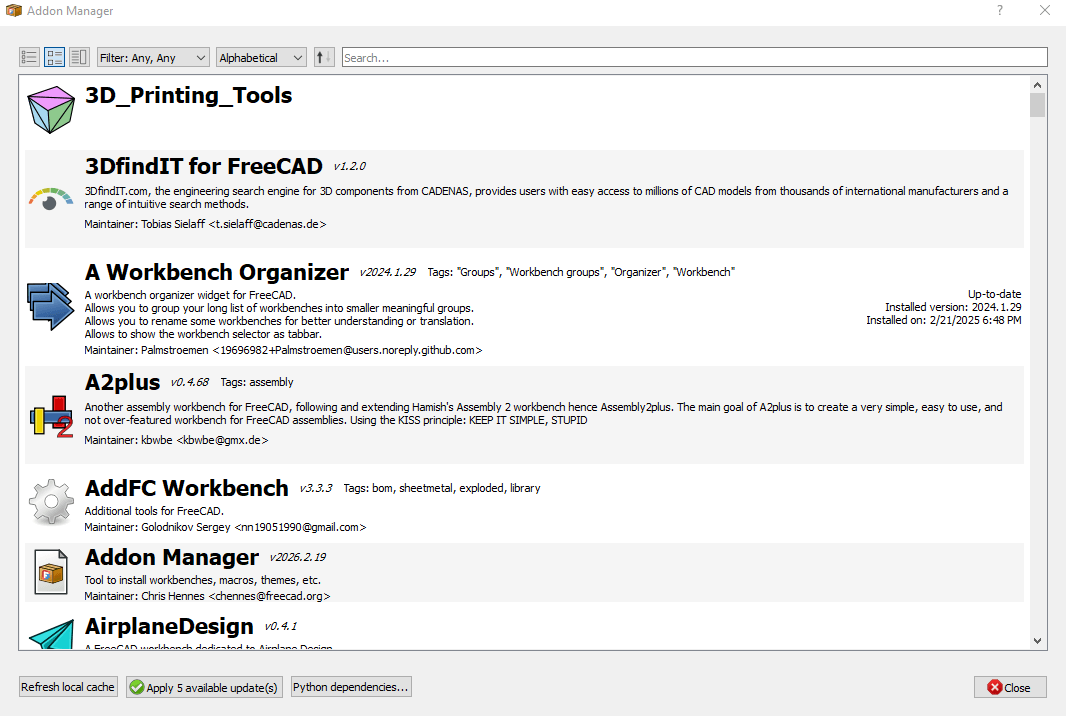
The recommended way to find and install all these add-ons is through the built-in Addon Manager (Tools → Addon Manager).
📚 Learning from External Workbenches
External workbenches are not just tools to use; they are a fantastic, in-depth learning resource. Here is how you can learn from them:
| Learning Opportunity | How to Use It | Example |
|---|---|---|
| Understand Tool Organization | See how a workbench structures its tools into menus and toolbars for a specific domain. | The Woodworking workbench organizes tools for furniture design, showing a logical workflow. |
| Solve Specific Problems | Study how a workbench solves a particular design challenge that the core workbenches don’t address. | The Curved Shapes workbench adds “guide rail” functionality for sweeps and lofts, enabling the creation of complex organic shapes like a boat hull, which is cumbersome to do manually. |
| Study Source Code (Python Workbenches) | Deconstruct the Python code to learn scripting and workbench development. The code is usually available in the workbench’s GitHub repository. | The Woodworking workbench has an API called MagicPanels.py with functions that attempt to solve the topological naming problem. You can study this to learn advanced FreeCAD Python techniques. |
| Learn from Example Files | Many workbenches include fully parametric example files that you can open, deconstruct, and modify. | The Woodworking workbench comes with a folder of fully parametric furniture examples (e.g., a bookcase) that you can adapt for your own projects. |
| Explore Development Practices | Examine how professional-grade workbenches handle version compatibility, translations, and user documentation. | The MOOC workbench uses a modular structure to add interactive tutorials and assessments, showing how to integrate a learning framework directly into FreeCAD. |
| Community Engagement | Use the forum threads and issue trackers for workbenches to see common problems and their solutions, and to interact with advanced developers. | The Woodworking workbench directs users to a specific FreeCAD forum thread for discussions and the GitHub issue tracker for bug reports. |
By exploring and deconstructing external workbenches, you move from being a user to a potential contributor, gaining deep insights into both specialized design domains and the inner workings of FreeCAD itself.
- Fasteners Workbench: https://github.com/shaise/FreeCAD_FastenersWB
- Add standard fasteners (screws, nuts, bolts) to your designs.
- A2Plus Workbench: https://github.com/kbwbe/A2plus
- A powerful assembly workbench for FreeCAD.
- Curves Workbench: https://github.com/tomate44/CurvesWB
- Advanced tools for working with curves and surfaces.
“Thank you for reading! If you found this article insightful and valuable, consider sharing it with your friends and followers on social media. Your share can help others discover this content too. Let’s spread knowledge together. Your support is greatly appreciated!”

My FreeCAD Projects at Amount of Coffee-: