Templates and example files are excellent resources for learning FreeCAD efficiently. Templates provide pre-formatted starting points for technical drawings, while example models allow you to deconstruct complete designs to understand professional workflows.
Also Read-:
- Let’s understand FreeCAD Part Workbench
- Visit My FreeCAD Video Tutorial Library
- FCViewer-: Easiest Way to Showcase FreeCAD Project
Here’s a brief overview of how you can use these resources to accelerate your learning, especially for mechanical CAD services.
📄 Templates: Your Starting Point for Technical Drawings
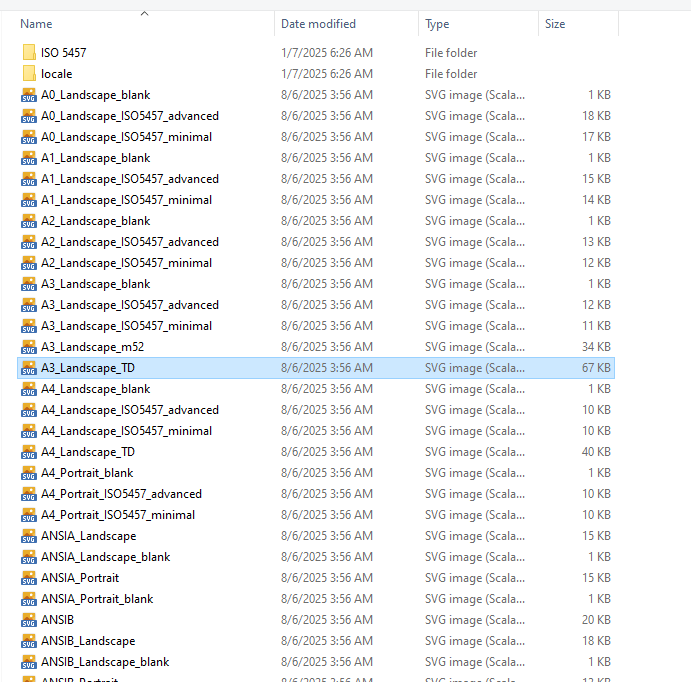
Templates in FreeCAD are primarily used with the TechDraw Workbench to create professional technical drawings. They define the paper size, borders, and title blocks for your documentation.
| Resource Type | Description | Learning Value | Access / Location |
|---|---|---|---|
| Built-in Templates | FreeCAD includes standard templates (A0-A4, US Letter, etc.) in various styles. | Study how professional title blocks are structured; examine frame dimensions and text placements. | TechDraw Workbench → Insert Page Using Template. Files located in $INSTALL_DIR/Mod/TechDraw/Templates/. |
| Custom SVG Templates | Create your own templates using Inkscape or other SVG editors. | Learn to add editable text fields (freecad:editable attribute) and understand FreeCAD’s SVG namespace requirements. |
Create in external editor, save as plain SVG, place in user template directory. |
| Community Template Collections | GitHub repositories and forum posts with user-contributed templates. | See how others handle different drawing conventions (ISO vs. US projections) and specialized title blocks. | FreeCAD GitHub Documentation; FreeCAD Forum. |
| DXF Templates | Templates for exporting drawings to DXF format. | Understand how to maintain consistent output across different file formats. | Same name/location as your SVG template, with .dxf extension. |
📦 Example Models: Learning by Deconstruction
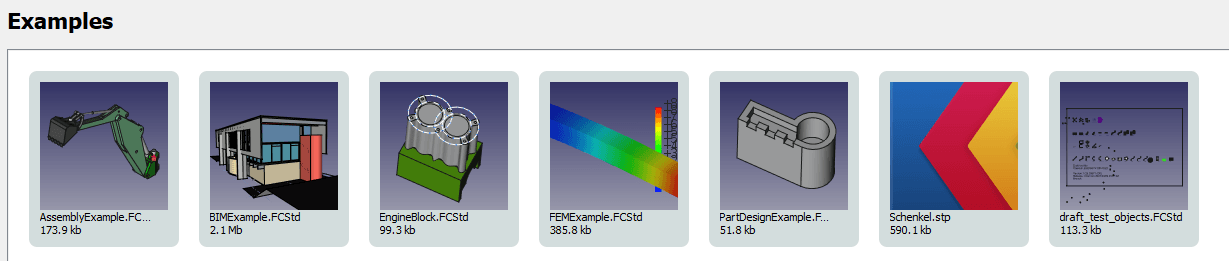
Example files are complete FreeCAD documents (.FCStd) that you can open, examine, and modify. They are perhaps the most powerful learning resource because they show you how experienced users build parametric models.
| Resource Type | Description | Learning Value | Access / Location |
|---|---|---|---|
| Official Tutorial Examples | Files accompanying official tutorials like the Basic Part Design Tutorial. | Study the exact model created in the tutorial; examine sketch constraints, feature tree organization, and parametric relationships. | FreeCAD Examples Repository on GitHub. |
| Built-in Examples | Example files that come with FreeCAD installation [from previous discussion]. | Explore how various workbenches (PartDesign, Assembly, FEM) are used in complete projects. | File → Open, navigate to FreeCAD installation’s Mod folder. |
| IFC Example Models | Architectural/BIM example files in IFC format. | Learn proper BIM data organization (IfcProject → IfcSite → IfcBuilding → IfcBuildingStoreys hierarchy); understand what makes a quality IFC model versus poorly exported junk data. | buildingSMART Sample Files -2; BIMPlot Collections. |
| Community Example Files | Users sharing their completed designs on forums. | See real-world problem-solving approaches; learn different modeling strategies for similar problems. | FreeCAD Forum (especially the “Users Showcase” section). |
| DigiKey Tutorial Files | Complete set of FreeCAD files from the DigiKey tutorial series. | Study multi-part assemblies and professional workflow examples [from previous discussion]. | ShawnHymel’s GitHub Repository. |
💡 How to Use These Resources Effectively
1. Start with Official Tutorial Examples
The Basic Part Design Tutorial example file is perfect for beginners. Open it alongside the tutorial and examine:
-
How sketches are fully constrained (notice the color change when constrained)
-
The feature tree order (Pad → Pocket → etc.)
-
Naming conventions for sketches and features
2. Deconstruct Before You Build
Open example files and work backwards:
-
Hide features one by one to understand the construction sequence
-
Edit sketch dimensions to see how the model updates parametrically
-
Examine constraint strategies—notice which dimensions are driven and which are driving
3. Study Template Structure
Open built-in SVG templates in a text editor:
-
Look for the
freecad:editableattribute that creates editable text fields -
Examine the
<!-- working space -->comment that defines where views can be placed -
Note the SVG namespace declaration:
xmlns:freecad="http://www.freecadweb.org/wiki/index.php?title=Svg_Namespace"
4. Compare Different Approaches
Download multiple example files of similar parts:
-
Notice different modeling strategies (pad vs. revolve, additive vs. subtractive)
-
See how different users organize their feature trees
-
Learn various constraint techniques
5. Modify and Experiment
Take an example file and deliberately break it:
-
Change dimensions beyond reasonable limits
-
Delete constraints and see what happens
-
Add your own features to existing models
For someone offering mechanical CAD services, the official tutorial examples are essential for mastering parametric modeling fundamentals, while the template system will help you create professional, branded technical drawings for your clients.
- FreeCAD Template Library: https://wiki.freecad.org/Templates
- Download templates for drawings, parts, and assemblies.
- Example Projects:
- Explore example projects included with FreeCAD:
- Go to File > Open.
- Navigate to the
Modfolder in your FreeCAD installation directory to find example files.
- Explore example projects included with FreeCAD:
“Thank you for reading! If you found this article insightful and valuable, consider sharing it with your friends and followers on social media. Your share can help others discover this content too. Let’s spread knowledge together. Your support is greatly appreciated!”

My FreeCAD Projects at Amount of Coffee-: