The FreeCAD Part Workbench is a fundamental modeling environment for creating and manipulating solid geometry using primitives and Boolean operations. Part workbench is tough to learn as compare to Part Design Workbench but you can perform more critical task in Part Workbench with Boolean Operation. Part Workbench is based on the Open CASCADE Technology geometry kernel, which provides the foundation for almost all 3D geometry in FreeCAD.
Here is a Quick Overview of its Core Tools:
| Tool Category | Key Tools | Description |
|---|---|---|
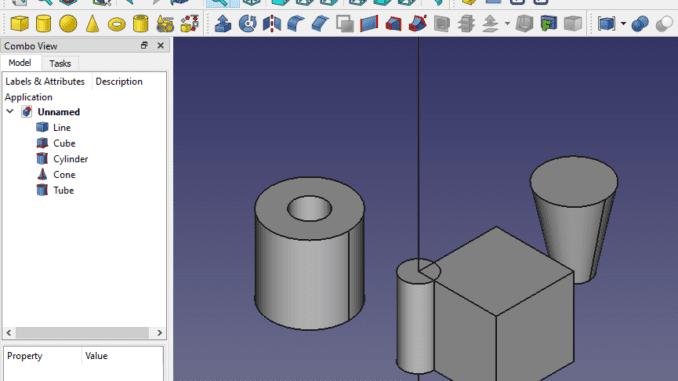
| Primitives | Box, Cylinder, Sphere, Cone, Torus | Creates basic geometric shapes as starting points. |
| Boolean Operations | Fuse (Union), Common (Intersection), Cut (Difference) | Creates complex shapes by combining or cutting primitives. |
| Modifications | Extrude, Revolve, Fillet, Chamfer, Loft, Sweep, Mirror | Modifies shapes by adding features, rounding edges, or creating patterns. |
FreeCAD is one of the best CAD applications that I have ever used throughout my career even it is not user friendly like other paid CAD application like SolidWorks and Autodesk Inventor but best thing which I like about FreeCAD is It is single CAD application that comes with all major essential tool Like Techdraw, FEM, Sheet Metal etc. FreeCAD is powered by OpenCasCade Kernal which is one of the industry rated CAD kernels.
💡 How to Think About the Part Workbench:
The Part Workbench is powerful, but it’s important to understand its role compared to other workbenches:
-
Part vs. Part Design Workbench: The Part Workbench uses a constructive solid geometry (CSG) approach, building complex objects by combining simple, discrete solids. The Part Design Workbench is used for creating complex, parametric, single-part solids, primarily by creating a sketch and then using features like Pad and Pocket to add and remove material unlike SolidWorks, Onshape etc. For intricate, parametric parts, you’ll likely use Part Design, but the solid it creates is itself a “Part” object that can be used in the Part Workbench for further Boolean operations.
⚙️ Key Concepts and Tools in Part Workbench:
The Part Workbench operates on a few core principles that make it the foundation for other workbenches.
| Concept/Tool | Description | Why It’s Foundational |
|---|---|---|
| Geometric Primitives | Create basic shapes: Box, Cylinder, Sphere, Cone, Torus, etc. | These are the raw materials. Every complex solid can be broken down into combinations of these primitives. |
| Boolean Operations | The heart of CSG. Tools to Fuse (Union), Cut (Difference), and Common (Intersection) shapes. | This is how you build complexity. You can fuse a cylinder to a box to make a boss, or cut a smaller cylinder from a box to make a hole. |
| Shape Builder | A more advanced tool to create shapes from simpler components like edges, wires, and faces . | Allows for bottom-up modeling, constructing a shape from its constituent parts. |
| Extrude, Revolve, etc. | Create shapes by extruding a 2D profile (sketch) or revolving it around an axis. | This connects 2D drafting (from the Draft Workbench or Sketcher) to 3D solid creation. |
| Check Geometry | A tool to validate if a shape is a valid, manufacturable solid. | Essential for ensuring your model is “watertight” and ready for export to 3D printing or CAM. |
🏛️ The Part Workbench as a FreeCAD Foundation:
Here is why the Part Workbench is considered the geometric foundation of FreeCAD:
-
Universal Geometry Kernel: The Part Workbench is a direct interface to FreeCAD’s underlying geometric modeling kernel, OpenCASCADE Technology (OCCT) . Everything you do in workbenches like Part Design, Draft, or even Arch, ultimately creates shapes that are processed by this same kernel.
-
The
Part::FeatureBase: Most objects you create in other workbenches (like a PartDesign Body or a Draft Wall) are built upon a core class calledPart::Feature. This means they all share the same fundamental properties and can be used as inputs for Part Workbench tools . -
Mixing Workbenches: Because of this shared foundation, you can freely mix tools. You can create a complex Pad in PartDesign, then use a Part Workbench Boolean operation to cut it with a primitive shape from the Part Workbench. This interoperability is a key strength.
-
Repair and Analysis: The Part Workbench provides essential tools for analyzing and repairing geometry (like
Check Geometry,Defeaturing), which are critical for preparing models for manufacturing or simulation.
💡 Part Workbench vs. PartDesign Workbench (Quick Comparison):
A common point of confusion for beginners is the difference between the Part and PartDesign workbenches. They are both for solid modeling, but they have different philosophies.
| Feature | Part Workbench | PartDesign Workbench |
|---|---|---|
| Philosophy | Constructive Solid Geometry (CSG) – building by combining primitives. | Feature editing – building by adding features (pads, pockets) to a base sketch. |
| Workflow | “Machine shop” approach: Combine and cut solids. | “Manufacturing” approach: Create a sketch, pad it, pocket it, etc., building a history of features. |
| Key Object | Individual shapes that can be combined. | A Body which is a cumulative container of features. |
| Best For | Simple parts, Boolean operations, working with imported geometry, and combining results from multiple workbenches. | Complex, single, contiguous solid parts where design history and feature editing are important. |
| Result | A final shape (often a Compound). |
A single, contiguous solid (the Body). |
In essence, Part Design is a more specialized and modern tool built on top of the Part Workbench’s foundation. You can think of the Part Workbench as the fundamental building blocks, and Part Design as a sophisticated assembly line for creating a specific type of part (a single, contiguous solid).
Part module of FreeCAD workbench uses the OpenCasCade object and function and part made with the use of Boolean operation. I have made detailed tutorial on How to use Boolean operation in FreeCAD.
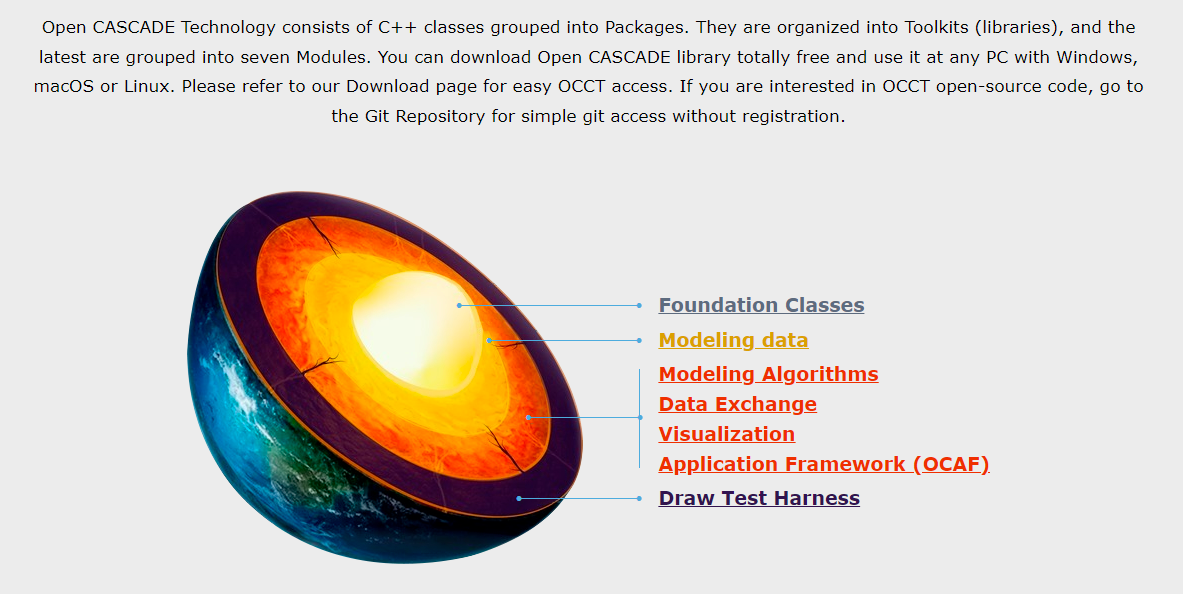
Image Credit-: https://dev.opencascade.org/
Core feature of FreeCAD Part workbench is geometric Primitives and standard shapes which comes from OpenCasCade terminology. A geometric primitive can be a point, a line, a circle, a plane, etc. A Shape in FreeCAD Part Workbench can be a vertex, an edge, a wire, a face, a solid or a union of other shapes.
At starting stage, it seems to be difficult to make part with geometric primitives and shape but once you familiar with Boolean operation you will enjoy part modelling with part design workbench. I hope you have like this post if you liked it then please share it on social media and also give your valuable suggestion in the comment section of this video.
“Thank you for reading! If you found this article insightful and valuable, consider sharing it with your friends and followers on social media. Your share can help others discover this content too. Let’s spread knowledge together. Your support is greatly appreciated!”
Watch Video Version of this Tutorial-:
 My FreeCAD Projects,Model & Drawing now on Gumroad